Retusagi: Your Next Keynote Template for Polished Presentations
You know that feeling when you're halfway through building a presentation, and the design just isn't coming together? The colors clash, the layouts feel disjointed, and you spend more time wrestling with formatting than refining your message. A cohesive visual story is crucial for holding attention, whether you're pitching a new business idea, teaching a workshop, or sharing a portfolio. This is where a thoughtfully designed template system becomes a true asset, transforming a chaotic process into a streamlined creative flow.
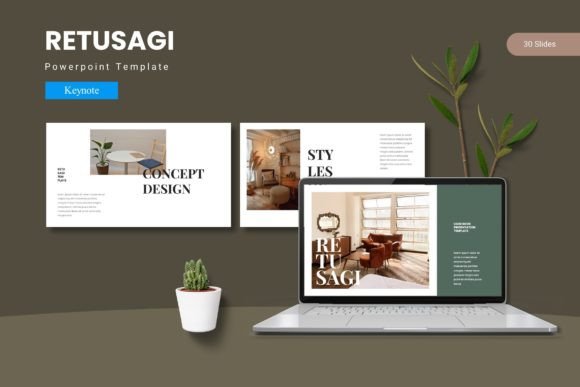
The Retusagi - Keynote Template is built to solve that exact problem. It's not just a collection of slides; it's a design framework intended to ensure every element you present feels intentional and unified. With a foundation of over 150 slides organized across five distinct color schemes, it offers a starting point for nearly any topic. The structure is based on master slides, which means when you make a change to a font, color, or layout element in one place, it updates consistently throughout your entire deck. This approach saves significant time and eliminates the visual inconsistencies that can make a presentation look amateurish.
A Visual System, Not Just a Slide Deck
What makes a template like this visually effective is its commitment to design principles. Each of the five color variations isn't just a simple hue swap; it's a carefully considered palette that affects the mood and professionalism of the entire presentation. You might choose a cool, muted palette for a corporate report, a vibrant and energetic scheme for a product launch, or a soft, elegant set for a creative portfolio. This built-in flexibility allows you to match the template to your brand's existing identity or the specific tone of your event without starting from scratch.
Beyond color, the Retusagi template includes handcrafted infographics and pixel-perfect illustrations. These aren't generic clip art; they are designed to be both informative and aesthetically pleasing. The ability to resize and edit every graphic means you can adapt a complex process diagram into a simple icon or expand a small chart to fill a full slide. This level of editability is crucial for making the template truly your own. The inclusion of picture placeholders that support drag-and-drop functionality further simplifies the process of adding your own imagery, ensuring your photos sit perfectly within the design's grid.
Practical Applications for Creators and Businesses
The real value of a versatile presentation template reveals itself in its everyday applications. For entrepreneurs and small business owners, it's a tool for building investor decks that look credible and polished. The section break slides are perfect for clearly demarcating different parts of your pitch, such as the problem, solution, market analysis, and financials. Consistency here builds trust and helps your audience follow your narrative.
Marketers and content creators can leverage it to design social media graphics that maintain a strong brand presence. Imagine exporting a beautifully designed slide with key statistics or a quote directly for Instagram or LinkedIn. The cohesive style ensures that every piece of content you share reinforces your visual brand. Similarly, for bloggers and educators, it can serve as the foundation for creating online course materials, webinar slides, or even downloadable PDF guides that look professionally published.
For designers, it's a massive time-saver for client work. Instead of building every presentation from the ground up, you can use the Retusagi framework as a starting point, customizing it extensively to fit the client's brand guidelines. The gallery and portfolio slides are particularly useful for creatives like photographers, architects, or graphic designers who need to showcase their work in a clean, compelling format. The template handles the layout, allowing you to focus on curating your best images.
Integrating Typography for Maximum Impact
While the template provides the structural and visual foundation, the fonts you choose will bring your content to life. The included Readme file provides information on the fonts used in the previews, which is a helpful starting point. However, the true power comes from understanding how to pair typography with this design system. The clean, modern layouts of Retusagi work exceptionally well with a range of typeface styles.
For headings, a bold sans serif font can create a strong, contemporary feel that commands attention. Pair that with a highly readable serif font for body text to ensure comfortable reading during longer presentations. Alternatively, for a more creative or luxurious brand, a refined serif font for headings can add elegance, especially when contrasted with a simple sans serif for supporting text. The key is to test your font pairings within the actual slide layouts. See how they interact with the infographic elements and white space. Good typography isn't just about looking nice; it's about enhancing readability and guiding the viewer's eye through your information hierarchy.
Remember, the goal is visual consistency. Once you settle on a font pairing that matches your project's personality—whether it's professional, friendly, innovative, or artistic—apply it uniformly. This consistency is what builds brand recognition and makes your materials feel cohesive across different platforms, from a keynote presentation to a social media post to a printed handout.
Making the Most of Your Design Assets
When you start with a comprehensive asset like Retusagi, think of it as a toolkit. The five color schemes give you immediate options for different moods or clients. The master slide architecture means your edits are efficient and system-wide. The resizable graphics allow you to scale elements without losing quality, which is vital for both digital screens and potential print materials like posters or invitation inserts.
A practical tip is to spend your first hour simply exploring the asset library. Open all the slides, check the infographic library, and understand how the color scheme files are organized. This upfront exploration will save you time later because you'll know exactly what tools are at your disposal. When customizing, make deliberate choices. Swap the placeholder text with your own content early to see how the layout handles your actual information. Adjust the color palette to match your brand's hex codes precisely. These small, thoughtful adjustments are what transform a generic template into a powerful extension of your brand identity.
Finally, always be mindful of licensing. For any commercial project—whether it's for a client, for sale, or for your own business promotion—ensure you have the appropriate license for both the template and any additional fonts or images you incorporate. This protects your work and ensures you're using your design assets responsibly.