Muerasa: A Presentation Template for Confident Visual Storytelling
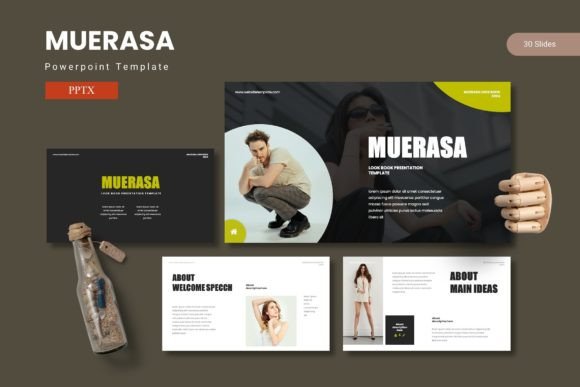
You know the feeling. You're preparing for a crucial pitch, a quarterly review, or a workshop, and the default PowerPoint themes just don't cut them. They feel generic, disjointed, and fail to capture the energy of your idea. The goal isn't just to share data; it's to make that data resonate, to tell a story that sticks with your audience long after the meeting ends. That’s where a thoughtfully designed asset like the Muerasa - Powerpoint Template comes into play. It’s more than a collection of slides; it’s a framework for building presentations that combine clean data visualization, compelling graphics, and impactful content layouts, allowing you to share your ideas with genuine confidence.
Beyond Basic Slides: The Anatomy of a Professional Deck
What makes a presentation template truly effective? It’s the thoughtful architecture behind every slide. Muerasa is built on a foundation of Master Slides, which ensures that any change you make to a font, color, or logo updates globally across your entire deck. This isn't just a convenience; it's a guarantee of visual consistency, a cornerstone of professional presentation and brand identity. The template offers 150+ total slides across five premade color schemes, giving you 30 distinct slides per color variation to build your narrative from introduction to conclusion.
The design philosophy centers on clarity and impact. Pixel-perfect illustrations and handcrafted infographics transform complex information into digestible, engaging visuals. Instead of struggling to align charts or format timelines, you can leverage these pre-designed elements. The picture placeholders with drag-and-drop functionality mean swapping in your own team photos or product shots is effortless. For a small business owner presenting to investors or a content creator outlining a brand partnership, this saves hours of formatting time and eliminates the frustration of misaligned elements.
Practical Applications: From Pitch Decks to Portfolio Showcases
The versatility of a well-structured template like Muerasa is its greatest strength. Consider these real-world scenarios where its features directly solve common problems:
- For Entrepreneurs and Marketers: Crafting a compelling brand identity presentation is non-negotiable. Use the gallery and portfolio slides to showcase previous work, product lines, or campaign results visually. The section break slides help segment your story logically—problem, solution, market opportunity, team, ask—creating a natural flow for your audience.
- For Designers and Creatives: A portfolio slide isn't just about showing images; it's about presenting your work in a context that elevates it. The clean, modern layouts act as a neutral yet sophisticated frame, ensuring your designs for packaging, social media graphics, or web design remain the focal point. The customizable color schemes mean you can match the template to your personal or client's brand palette in seconds.
- For Educators and Trainers: Engagement is key. The infographic slides are perfect for breaking down processes, statistics, or historical timelines. Instead of bullet-point overload, you can present the same information in a more visual, memorable format that aids comprehension and retention during workshops or lectures.
Think of it as your presentation toolkit. The Muerasa - Powerpoint Template provides the structure, but you infuse it with your unique content. This is where your expertise, your data, and your story come to life, supported by a design that commands attention and facilitates understanding.
Aligning Design with Your Communication Goals
Choosing a design asset is a strategic decision. The visual style of your presentation should align with your message and your audience's expectations. The modern, clean aesthetic of Muerasa—characterized by balanced whitespace, crisp lines, and harmonious color schemes—communicates professionalism and clarity. This is particularly valuable for:
- Building Brand Recognition: Consistent use of your brand colors (easily applied via the five color variations) and typography throughout a presentation reinforces your brand identity. Every slide becomes a touchpoint that strengthens visual recall.
- Enhancing Readability and Focus: Clutter is the enemy of comprehension. The layouts are designed to guide the viewer's eye, using hierarchy and spacing to emphasize key points. This improves readability and ensures your core message isn't lost in visual noise.
- Boosting Audience Engagement: Dynamic elements like resizable and editable graphics allow you to create subtle animations or highlight specific data points. A well-placed infographic or a striking image in a portfolio grid can break up text-heavy sections and re-engage attention.
Before diving in, take a moment to review the readme file included in the package. It contains vital information on the font and photo resources used, ensuring you can replicate the demo's look or substitute with your preferred assets seamlessly. Understanding these details upfront streamlines your workflow.
Maximizing Your Investment: Tips for Effective Use
To get the most out of any premium design template, a thoughtful approach is needed. Here’s how to ensure your final presentation is polished and effective:
- Start with a Clear Outline: Before opening the file, sketch your narrative arc. Know which slides from the 30-slide set per color will best serve each part of your story—whether it's a data-heavy analysis, a team introduction, or a visionary conclusion.
- Customize with Purpose: The five color variations are a starting point. Adapt them to your brand guidelines, but do so consistently. Use the Master Slides to make global changes for efficiency and uniformity.
- Focus on Content, Not Just Decoration: The stunning infographics and illustrations are tools to clarify your message, not just to decorate. Ensure every visual element supports the point you're making. Ask yourself: "Does this graph make my data easier to understand?" or "Does this icon help explain the process?"
- Test on the Actual Display: Always preview your presentation on the screen or projector you'll use for the actual talk. Check for font readability at a distance and ensure high-resolution images (all graphics are resizable and editable) appear crisp.
Ultimately, a tool like the Muerasa - Powerpoint Template is about empowerment. It removes the technical barriers of design, allowing you to focus on what truly matters: your message, your data, and the connection you make with your audience. It’s a practical asset for anyone who needs to communicate ideas visually, from a creative entrepreneur pitching a new product to a marketing professional outlining a quarterly strategy. By providing a polished, cohesive, and adaptable foundation, it helps transform a routine presentation into a confident visual conversation.