Retro Gaming Banners: Capture the Nostalgic Vibe
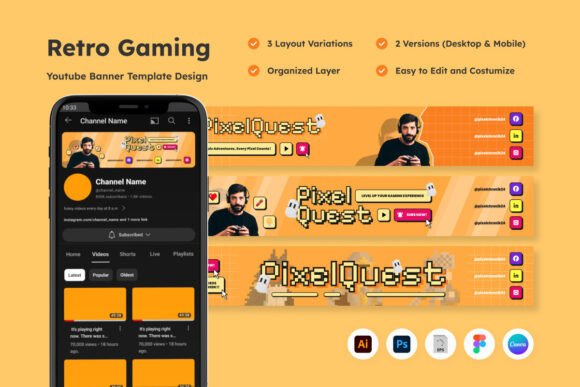
There is a specific emotional resonance that hits when you see pixel art and 8-bit typography. For content creators in the retro gaming niche, tapping into that nostalgia isn't just a stylistic choice; it is the entire brand strategy. Your channel header is the first handshake with your audience, and using a dedicated template designed for this aesthetic ensures you aren't just playing the game, but setting the stage for it. A specialized design asset, like the YouTube Banner for Retro Gaming, offers a vibrant, pixel-art-inspired layout that immediately signals to viewers that they have found a home for classic gaming content. It bridges the gap between the raw, gritty feel of arcade cabinets and the polished requirements of modern video platforms.
More Than Just Pixels: The Psychology of Retro Design
Why does this specific style work so well for branding? It comes down to trust and familiarity. When a viewer clicks on a channel and sees a banner featuring dynamic layouts, bold typography, and that distinct "CRT glow," they instantly understand the channel's value proposition. This template utilizes RGB color profiles at 72dpi, which is the standard for screen viewing, ensuring the colors pop exactly as intended on monitors, tablets, and phones.
However, the utility of this design extends far beyond just a YouTube channel header. Because the asset is fully layered and editable, it functions as a robust starter kit for broader brand identity work. Consider the versatility required by a small business owner or a creative entrepreneur in the gaming space:
- Social Media Graphics: The visual elements can be extracted to create cohesive thumbnails, community post images, or even animated overlays for Twitch.
- Merchandise and Packaging: If you sell retro-inspired t-shirts or posters, the layout can be adapted for print mockups, provided you scale the vector elements correctly.
- Event Invitations: Hosting a local gaming tournament or a launch party? The pixel-art-inspired elements make for eye-catching digital invites that set the mood immediately.
The key is that you aren't starting from a blank canvas. You are working within a framework that already understands the visual communication needs of the gaming community.
Practical Workflow: Customization and Typography
One of the most significant hurdles in design is font licensing and compatibility. This template addresses that by utilizing free fonts and including a documentation file with all necessary information. This is a massive relief for content creators who want to avoid the headache of legal compliance in commercial projects.
When you open the files—whether in Adobe Photoshop, Illustrator, Figma, or even via the Canva link—you will find that the text, color, and objects are fully editable. This allows for precise font pairing. For instance, if the default blocky display font doesn't match your specific niche (perhaps you focus more on JRPGs than platformers), you can swap it for a sans serif font that retains that technical feel but offers a slightly softer readability.
Here is a practical tip for testing your typography within this layout: Readability considerations are paramount on mobile devices. The template includes specific dimensions for mobile (1546x423 px), but you must ensure your text doesn't get lost in the "safe zone." Always check your edits on a smartphone simulator before finalizing. A bold typography choice might look great on a desktop monitor but become illegible noise on a small screen.
Technical Specifications for the Modern Creator
The file package is built for flexibility, a crucial requirement for anyone managing multiple design assets. You receive .PSD, .AI, .EPS, and .FIG files. This cross-compatibility means that whether you are a graphic designer working in a professional studio or a hobbyist using free web-based tools like Figma or Canva, you have access to the same high-quality source material.
The inclusion of three distinct layout designs within the same package is particularly useful for A/B testing your brand presentation. You might find that a centered layout works best for a review channel, while a left-aligned layout better suits a Let's Play channel where you need space for a webcam overlay.
Furthermore, the "fully layered" nature of these files cannot be overstated. It allows for non-destructive editing. If you decide six months from now to rebrand your channel with a darker, more "cyberpunk" retro aesthetic, you can easily adjust the color gradients and swap out the background elements without destroying the original structure of the banner.
Strategic Application for Business Growth
For the entrepreneur or small business owner, a professional appearance is directly linked to audience retention. A cohesive visual consistency across your YouTube channel, your Discord server, and your merchandise store builds brand recognition. When a viewer sees that distinct retro style, they should immediately associate it with your content quality.
This asset is not just a decoration; it is a marketing asset. By utilizing the Adobe Illustrator (.AI) and EPS files, you can scale the design elements for high-resolution print materials, such as posters or packaging for physical products. The sharpness of vector graphics ensures that your branding remains crisp, whether it is displayed on a 4K monitor or printed on a cardboard box.
Ultimately, the goal is to spend less time wrestling with technical setup and more time creating content. By leveraging a pre-structured, customizable template that understands the specific visual language of retro gaming, you streamline your production workflow and elevate your channel's professional standard. It is about giving your passion a proper frame—a digital arcade cabinet that invites the world to come and play.