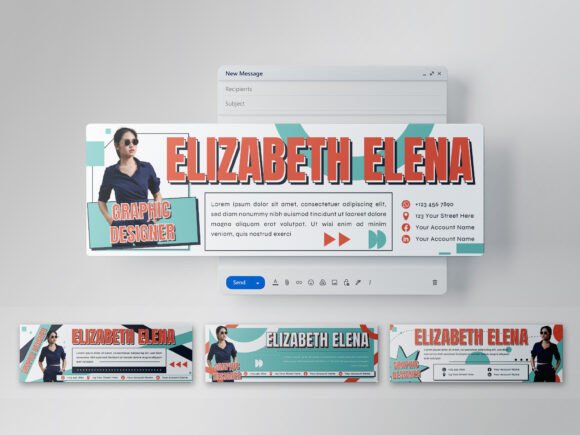
Streamline Your Brand's Digital Handshake with a Signature Template
Every email you send is a touchpoint. It's a chance to reinforce who you are, what you do, and how you can be reached. Yet, so many professionals and businesses end their messages with a plain text sign-off or a cluttered, inconsistent block of information. A cohesive, professional email signature isn't just a nice-to-have; it's a fundamental piece of your brand's visual identity and a subtle marketing tool that works tirelessly in the background. For those who need a polished solution without the design overhead, a versatile Bundle Email Signature Template offers a practical path forward.
Beyond the Basics: What This Template Bundle Offers
This isn't a single, rigid design. The bundle provides four distinct style variations, giving you the flexibility to match the signature's personality to different business contexts or to simply refresh your look periodically. Designed at a standard 600x200 pixel dimension, these templates are optimized for email clients, ensuring they display correctly without overwhelming the message itself. The use of a 72 DPI resolution is deliberate and practical, keeping file sizes manageable for quick loading in inboxes—a critical factor for user experience.
The true value for creators and business owners lies in the customization. Delivered as fully layered Adobe Illustrator (.Ai) and EPS files, the templates are built for easy editing. You can swap out text, adjust color schemes to match your brand palette using the specified RGB color mode, and rearrange elements to suit your preference. The inclusion of free fonts removes a common hurdle, allowing you to implement the design immediately without additional licensing costs. It’s important to note that mockups and stock images are not included, which keeps the focus on the core design asset and encourages you to personalize it with your own imagery or brand photography.
Practical Applications for Multipurpose Businesses
The "multipurpose" aspect of this bundle is its strongest feature. Its clean, modern typography and structured layouts make it a suitable foundation for a wide range of professions. Consider these real-world uses:
- For Marketing Agencies & Freelancers: Use one style for client-facing correspondence to project professionalism, and a slightly different variation for internal team communications to maintain brand consistency across the organization.
- For Webinar Hosts & Educators: A signature can serve as a mini landing page, linking directly to registration pages, course catalogs, or resource libraries, driving engagement with every email reply.
- For E-commerce & Digital Product Sellers: Incorporate links to your latest collection, a customer support portal, or social media profiles. The structured layout helps guide the reader's eye to the most important call-to-action.
- For Content Creators & Bloggers: It’s an underutilized channel for promoting new blog posts, podcast episodes, or YouTube videos to an already engaged audience—your email contacts.
This template moves your signature from a passive identifier to an active component of your brand identity and marketing assets.
Enhancing Professional Presentation and Brand Recognition
Visual consistency is the bedrock of brand recognition. When a client sees the same color scheme, font style, and layout in your email signature, on your website, and in your social media graphics, it builds subconscious trust and familiarity. This bundle facilitates that consistency. By using the provided sans serif font styles, you opt for a clean, modern typeface that prioritizes readability on screens—a key consideration for any digital communication.
A well-designed signature also elevates your professional presentation. It signals attention to detail and suggests that the same care is applied to your work. This isn't about being flashy; it's about being polished. The structured format ensures your contact information, title, and company name are immediately accessible, improving the user experience for anyone trying to reach you.
Making It Your Own: A Practical Guide to Customization
Getting started is straightforward, but a few best practices will help you maximize the template's potential.
- Align with Your Project Goals: Before editing, decide what you want your signature to achieve. Is its primary purpose to provide contact info? To drive traffic to a specific page? To showcase a professional credential? Let that goal guide your customization.
- Test Your Font Pairings: While the bundle includes fonts, you may want to substitute one with your existing brand display font or a premium font you've licensed. The key is to maintain hierarchy and readability. Typically, pairing a clean sans-serif for body text with a slightly more distinctive font for your name or company works well.
- Check Commercial Licensing: The included fonts are free, but if you decide to use a different commercial font, ensure your license covers use in digital documents like email templates. This is a crucial step often overlooked by small business owners.
- Simplify for Impact: Avoid the temptation to cram in every social media link and a lengthy tagline. A cluttered signature loses its effectiveness. Stick to the most vital information and one or two key links that align with your current goals.
This Bundle Email Signature Template is more than just a design asset; it's a functional tool for clear communication and subtle branding. By taking the time to customize it thoughtfully, you turn a routine email footer into a consistent, professional extension of your business that works for you with every message you send.