Turosa: Crafting Cohesive Presentations with a Versatile Google Slide Template
You’ve spent hours perfecting your brand’s color palette, selecting the right imagery, and crafting a compelling message. Yet, when it comes time to present your ideas—to investors, clients, or your own team—the deck falls flat. It feels generic, disjointed, or simply doesn’t reflect the quality of your work. This is a common frustration for entrepreneurs, designers, and marketers who understand that visual communication is about more than just putting words on a screen; it’s about telling a story that resonates and persuades. The tools you use to build that story matter profoundly.
Beyond Slides: A Framework for Visual Storytelling
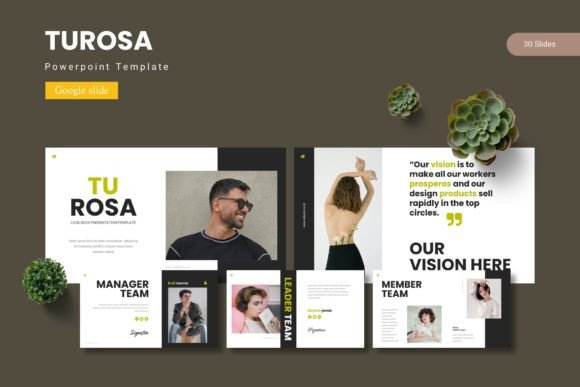
The Turosa - Google Slide Template isn't just a collection of pre-made slides; it's a structured system for building professional narratives. With over 150 slides organized into five distinct color schemes, it provides a foundational framework that ensures visual consistency from the first title slide to the final call-to-action. This is crucial for maintaining brand recognition. When your internal team meeting deck uses the same visual language as your client-facing proposal, it reinforces a unified and trustworthy brand identity. The inclusion of master slides means you can make a global change to a font or color, and it will update across the entire presentation, saving you from tedious manual adjustments and guaranteeing pixel-perfect alignment throughout.
Practical Applications for Modern Creators and Businesses
The true value of a design asset like Turosa lies in its adaptability across various projects. Consider a small business owner preparing a pitch deck. Using the template’s handcrafted infographics and section break slides, they can transform dry financial data into a compelling visual journey, making complex information digestible for potential investors. For a content creator or blogger, the gallery and portfolio slides are invaluable. They can curate a visual showcase of their work—be it photography, graphic design projects, or product shots—in a clean, professional layout that elevates their brand above the noise of social media feeds.
Marketers will find the drag-and-drop picture placeholders a significant time-saver when creating campaign overviews or quarterly reports. Instead of wrestling with alignment and spacing, they can focus on the strategic message. The template’s design principles also extend beyond formal presentations. The color schemes and layout logic can inspire cohesive social media graphics, ensuring your Instagram posts and LinkedIn carousels feel like part of the same family as your webinar slides. This kind of visual synergy is what builds a memorable brand across multiple touchpoints.
Aligning Design Choices with Project Goals
Choosing the right template is about matching its personality to your objective. Turosa’s clean lines and modern typography make it a strong candidate for projects aiming for a professional, trustworthy, and contemporary feel. It’s well-suited for corporate training materials, startup pitch decks, educational workshops, and detailed project proposals where clarity and organization are paramount. The five color variations allow you to quickly align the deck with your existing brand guidelines or choose a palette that evokes the right mood for a specific audience.
When working within any template, a key piece of advice is to use its structure as a guide, not a cage. The provided layouts for infographics and portfolios are excellent starting points, but don’t hesitate to customize them. Adjust the weight of text, swap placeholder images with your own high-quality photography, and use the editable graphics to reinforce your unique message. The goal is to use the template’s professional scaffolding to build something that is authentically yours. Always test your final presentation for readability, ensuring text is legible against background colors and that animations or transitions, if used, serve to enhance understanding rather than distract.
Maximizing Your Investment in Design Assets
Integrating a resource like the Turosa - Google Slide Template into your workflow is an investment in efficiency and quality. To get the most from it, start by reviewing the included readme file for font and photo information. This ensures you can replicate the intended look or make informed substitutions. Consider how the template’s style can influence other design assets. The color palettes can be applied to your website, the clean layouts can inspire brochure designs, and the overall aesthetic can guide your approach to packaging or merchandise design.
For those using it in commercial projects, it’s always wise to double-check the licensing terms to ensure your usage is covered, especially for client work or digital products for sale. By treating the template not as a one-off file but as a core component of your design toolkit, you establish a system for producing polished, on-brand presentations quickly. This frees up mental space and time to focus on what truly matters: the content and strategy behind your visuals, allowing you to communicate your ideas with the confidence and professionalism they deserve.