Streamline Your Finance App Design with FinApp UI KIT
Building a mobile application from scratch can feel like navigating a maze without a map. You have the idea, the features, and the user flow in mind, but translating that vision into a polished, professional interface often becomes the most time-consuming hurdle. This is where a comprehensive design toolkit transforms the entire development process, saving weeks of work while ensuring visual consistency across every screen.
What Makes This Mobile UI Kit Stand Out
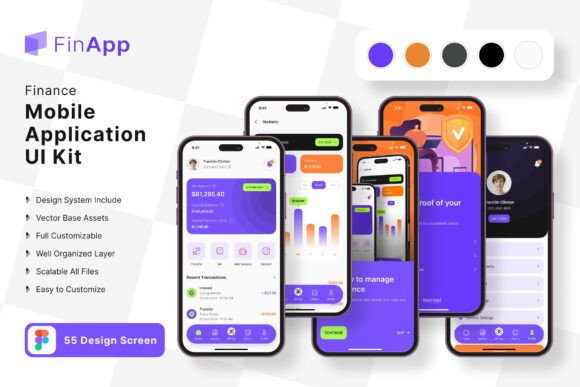
The FinApp Finance App Mobile UI KIT delivers exactly what busy designers and entrepreneurs need: a complete collection of 55 pixel-perfect screen designs paired with over 80 UI elements. Rather than spending hours drawing buttons, input fields, and navigation bars from scratch, you receive a library of pre-built components ready for immediate use. Each element follows modern design principles with clean lines, balanced spacing, and intuitive layouts that users already expect from professional financial applications.
What separates this toolkit from generic templates is the attention to detail in every vector layer. The screens cover essential finance app functions including account dashboards, transaction histories, budget trackers, payment interfaces, and profile settings. Whether you are designing a personal budgeting tool, a banking application, or an investment platform, the variety of templates provides a solid foundation that adapts to different financial service niches.
Practical Applications Across Different Projects
Small business owners launching their first mobile app find tremendous value in starting with established design patterns. Instead of guessing where to place a transfer button or how to structure a monthly spending report, these templates offer proven layouts that users find familiar and easy to navigate. The result is faster development cycles and fewer revision rounds with your development team.
Designers working with multiple clients appreciate the scalability of 100% vector layers. When a client requests a finance app for both iPhone and Android platforms, resizing elements becomes effortless. The symbol objects allow you to update a single component and watch changes cascade throughout the entire project automatically. This feature alone can reduce design revision time by half on larger projects.
Marketing teams creating promotional materials for fintech startups also benefit from these templates. Social media graphics showcasing app screenshots, investor pitch decks featuring interface previews, and website hero images displaying product demonstrations all become simpler when you have high-quality screen designs readily available. The consistent visual language across all 55 screens ensures your marketing materials look cohesive regardless of which screens you choose to feature.
Customization That Actually Works
One common frustration with design templates is the difficulty of making them feel unique to your brand. The FinApp UI KIT addresses this through fully editable Figma files where every element can be modified without restrictions. Changing the primary color scheme from blue to green takes seconds when you use the built-in color styles. Want to swap out icons? The free icon vector collection included in the package provides alternatives that match the overall aesthetic.
The free font integration means you avoid additional licensing costs that often surprise designers mid-project. Typography plays a crucial role in finance applications where readability directly impacts user trust. Numbers, decimal points, and currency symbols must render clearly at various sizes, and the included typeface handles these requirements gracefully across different screen densities.
Consider how your brand identity translates into the mobile space. If your company uses a specific color palette, you can systematically update every screen to reflect those exact hex values. The layered file structure means you never have to hunt through nested groups to find a specific button or text field. Everything is organized logically, making customization intuitive even for designers who are new to the file.
Building Visual Consistency for Stronger Brand Recognition
Professional presentation matters enormously in the finance sector where users entrust sensitive personal information to your application. Inconsistent spacing, mismatched button styles, or irregular typography sizes erode confidence before users even explore your features. Starting with a unified design system eliminates these problems from the beginning.
The 80+ UI elements included in this kit work together harmoniously because they share common design DNA. Shadows, corner radii, padding values, and color relationships all follow the same rules throughout. When you build screens using these components, the finished product naturally feels polished and intentional. Users may not consciously notice perfect alignment or consistent icon weights, but they absolutely feel the difference between a professionally designed interface and one that was cobbled together without a system.
Brand recognition strengthens when every touchpoint shares visual characteristics. Your mobile app icon, the in-app interface, your website, and your social media presence should all feel like members of the same family. Using these templates as your mobile design foundation makes achieving that consistency significantly easier.
Accelerating Your Development Timeline
Entrepreneurs often underestimate how much time interface design consumes during app development. Weeks can pass while iterating on screen layouts, adjusting element positioning, and testing different visual approaches. With 55 ready-made screens covering the most common finance app functions, you skip the exploratory phase entirely and move directly into refinement.
The practical workflow looks something like this: select the screens closest to your app requirements, customize colors and typography to match your brand guidelines, rearrange elements to fit your specific feature set, and hand the designs to your development team. What previously required a dedicated UI designer for several weeks now becomes achievable in days, even for teams with limited design resources.
For those building minimum viable products to test market demand, this approach proves especially valuable. You present investors and early users with a professional-looking prototype without committing months to design exploration. The feedback you gather then informs which elements to keep, modify, or replace before final development begins.
Considerations Before Getting Started
Before downloading any design asset, verify that the licensing terms align with your intended use. Most premium UI kits like this one permit use in commercial projects, but confirming the specific terms prevents legal complications later. Also note that preview images showing device mockups and lifestyle photos are not included in the download files, so plan to source your own imagery for presentations and marketing materials.
Take time to review all 55 screens before committing to a design direction. You might discover layout patterns you had not considered that better serve your user flow. The variety included in this collection often sparks new ideas about feature organization or information hierarchy that improve the overall user experience beyond your original concept.
Pairing these UI templates with complementary design assets creates even stronger results. A cohesive brand identity system that includes matching website templates, social media kits, and print materials ensures every customer interaction reinforces your professional image. The modular nature of this UI kit makes it an excellent starting point for building that broader design ecosystem around your finance application.